
A Persona tells the Agent who you want to reach. You fill in 36 details. The Agent uses them to find the right leads, score each one, and write the right messages.
Prerequisites
- An active QuantumOutbound Agent
- A clear idea of who you sell to (or use ChatGPT to help — see the Pro Tip below)
Why Personas Matter
The persona is the most important part of your Agent. It does three things:
- It finds leads. Missions use your persona to search the market.
- It scores leads. When the Agent sees a new lead, it checks each persona. It picks the best fit. Then it gives the lead a score from 0 to 100. High scores get contacted first.
- It writes messages. The persona's pain points, goals, and proof points tell the AI how to talk to each lead. See How AI Assists in Personalization for how this works.
👉 Note: A fuzzy persona gives you fuzzy leads and weak messages. The 36 details help the AI make sharp choices.
Where to Find Personas
- Open your Agent
- Click the Personas tab
- Click Create Persona in the top-right

You can have many personas in one Agent. The Agent picks the best one for each lead.
How to Create a Persona
Personas define who you want to target. Good personas help campaigns reach the right people.
When you fill in your Agent info — company link, services, and description — QuantumOutbound creates personas for you on its own.
⚠️ Warning: Always check the auto-created personas before you launch any campaign. Make sure they match the audience you want to reach. Edit anything that looks off, then press Save Changes.
You can also create new personas yourself. Click Create Persona in the top-right. The Generate Persona with AI view opens by default. Pick one of two options:
Option 1: Generate with AI (Recommended)
Type a short description of your ideal customer. You can also paste text from an existing ICP document.
Include details like:
- Who you want to target
- Company size
- Job title
- Industry
- Location
- (Optional) Who you do not want to target
Good prompts also share:
- What you sell and what problem it solves
- 2 or 3 real customers
- The job title you sell to most
- Your average deal size and sales cycle
The AI builds the persona for you.
Want to exclude certain people? Tell the AI in your prompt (e.g., "skip junior roles" or "do not target marketing agencies"). The AI marks those filters as excluded — they show in red on your persona form. Included filters show in green.
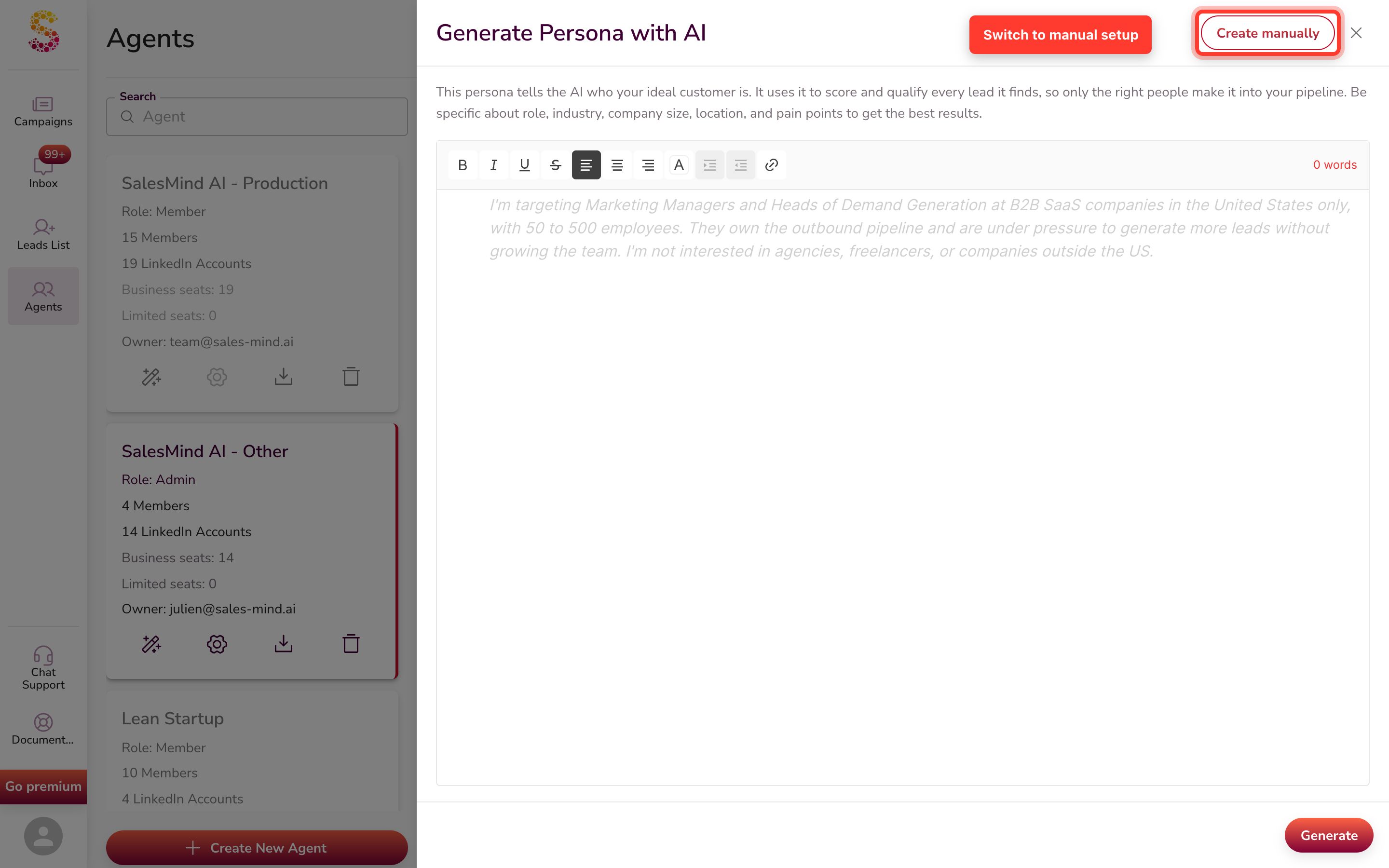
⚠️ Warning: Always review the result and edit what you need. Then press Save Changes.
💡 Tip: Not sure what to write? Scroll down to the Pro Tip section below for a ready-to-use ChatGPT prompt.
Option 2: Create Manually
To switch to manual setup, click Create manually in the top-right of the AI view. Then fill in each field one by one — Full Name, Demographics, Job Title, Seniority Level, Job Function, and more.
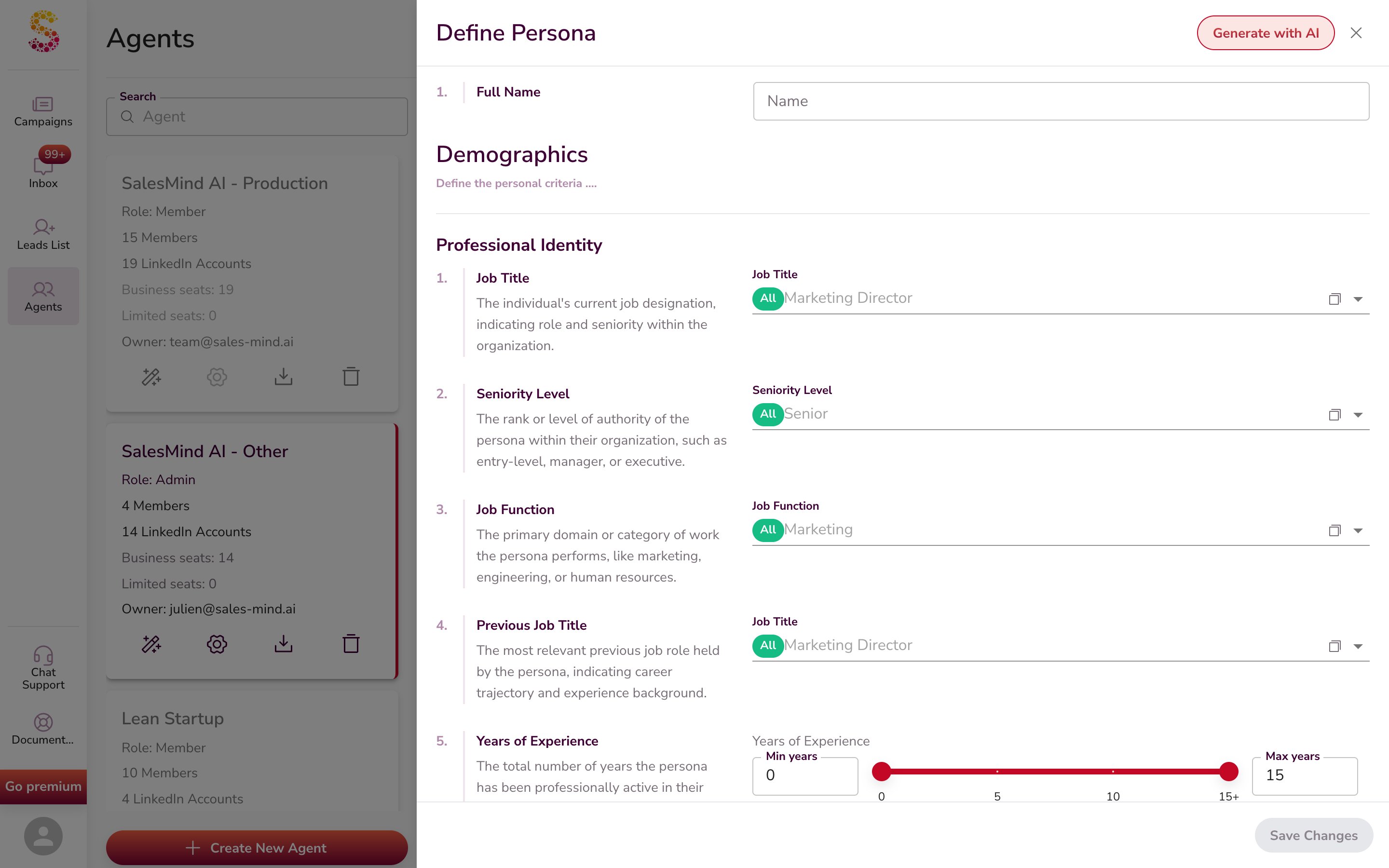
Include or exclude options. Most fields work the same way. Job Title, Industry, Skills — each option has two buttons: Include and Exclude.
- Click Include to add the option to your filter — it shows in green.
- Click Exclude to leave it out — it shows in red.

Excluded options show up as a red chip in the filter field:

Use Exclude to remove specific titles, industries, or companies from your search without losing the broader filter.
How Many Personas Do You Need?
Aim for at least 3 detailed personas. The more detail you add, the better your campaigns will perform.
Create one persona per profile. Different roles and industries have different pain points. They need different services. They reply to different messages. You wouldn't pitch the same way to a CEO and an HR specialist. You wouldn't sell the same service to a hotel owner and an AI engineer.
So:
- Build a separate persona for each job role you sell to
- Build a separate persona for each industry you serve
- Don't be afraid to make many — more personas mean sharper targeting
⚠️ Warning: Don't stack too many narrow filters. One job title + one city + niche industry + tight company size + specific years at company = very few leads.
Rule of thumb: Keep each persona focused on one role in one industry. Stay broad on the other filters (location, company size, years of experience). This gives you sharp targeting AND enough leads to fill your pipeline.
The 36 Details
The form has three main sections: Demographics, Firmographic, and Matching Service. Each has sub-groups. You don't have to fill every field, but more detail means sharper results.
Demographics
Defines who the person is.
Professional Identity (10 fields)
| # | Field | What it is |
|---|---|---|
| 1 | Job Title | Their current job (e.g., "VP of Marketing", "Head of Growth") |
| 2 | Seniority Level | Rank or authority (C-Level, VP, Director, Manager, IC) |
| 3 | Job Function | Their work area (Marketing, Sales, Engineering, Ops) |
| 4 | Previous Job Title | The last role they held |
| 5 | Years of Experience | Total years in their field |
| 6 | Years in Current Role | How long in this exact role |
| 7 | Years at Company | How long at this employer |
| 8 | Skills | Tools and skills they list on LinkedIn |
| 9 | Licenses / Certifications | Professional credentials they hold |
| 10 | Services Offered | What their team or company sells |
Location & Work Style (3 fields)
| # | Field | What it is |
|---|---|---|
| 11 | Location | Country, region, or city they work in |
| 12 | Work Style | Remote, in-office, hybrid, agile, etc. |
| 13 | Languages Spoken | Languages they use at work |
Education & Social Presence (2 fields)
| # | Field | What it is |
|---|---|---|
| 14 | Education Level | Highest degree (Bachelor's, Master's, PhD) |
| 15 | LinkedIn Followers | Size of their LinkedIn audience |
Psychographics (4 fields)
| # | Field | What it is |
|---|---|---|
| 16 | Age Range | Min and max age |
| 17 | Gender | Gender identity |
| 18 | MBTI Personality Type | Myers-Briggs type (e.g., ENTP) |
| 19 | Astrological Sign | Zodiac sign |
Firmographic
Defines the company they work for.
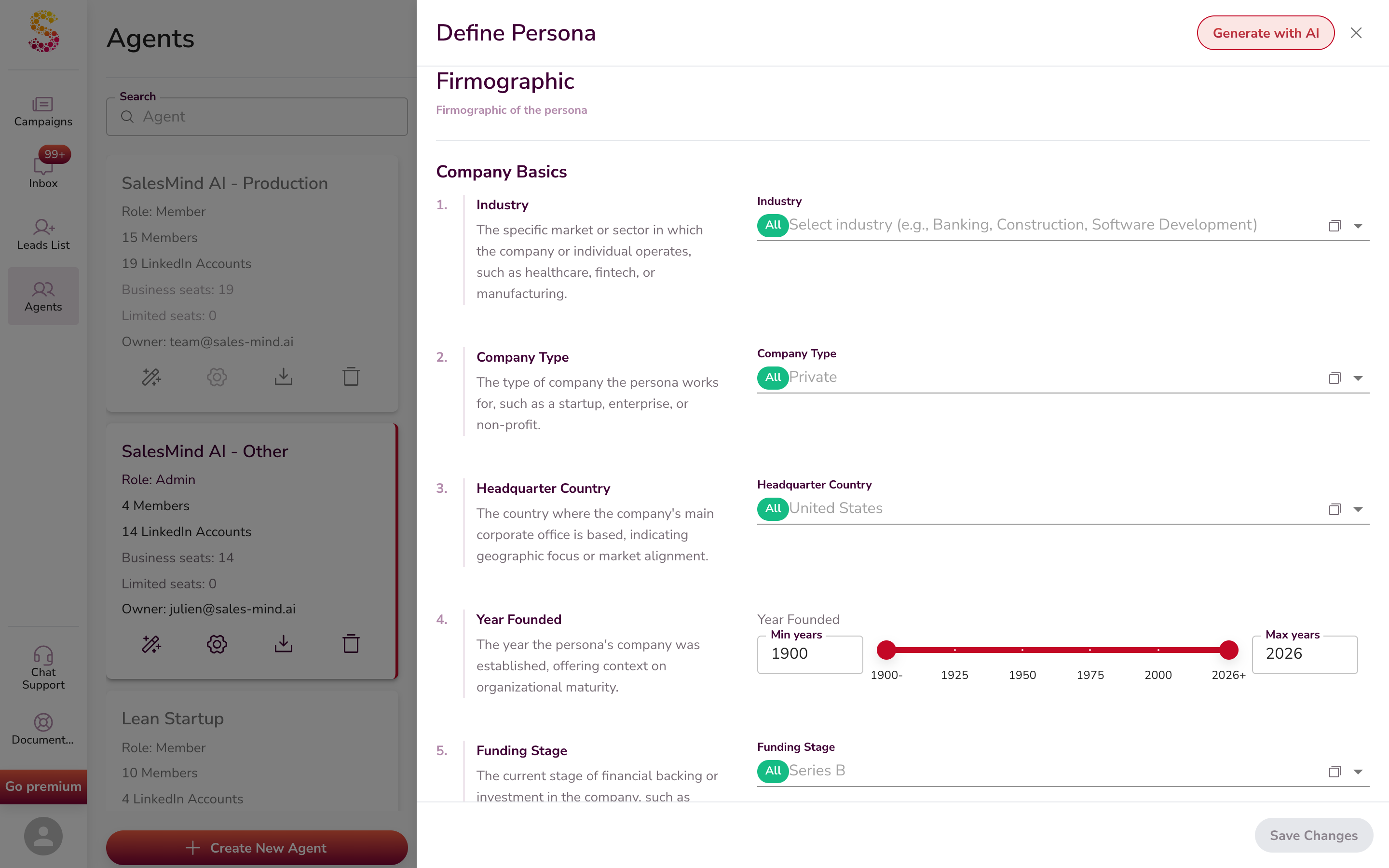
Company Basics (5 fields)
| # | Field | What it is |
|---|---|---|
| 20 | Industry | The LinkedIn industry the company is in. For the full list and how to handle niches like UCaaS, CCaaS, or channel resellers, see Import Leads by AI Lead Finder. |
| 21 | Company Type | Private, Public, Startup, Non-profit |
| 22 | Headquarter Country | Where the main office is |
| 23 | Year Founded | When the company started |
| 24 | Funding Stage | Seed, Series A, Series B, IPO, etc. |
Company Size and Revenue (5 fields)
| # | Field | What it is |
|---|---|---|
| 25 | Company Size | Number of employees |
| 26 | Annual Revenue | Yearly income |
| 27 | Department Size | People in their specific department |
| 28 | Department Growth | Is their team growing? |
| 29 | Company Followers | The company's social media followers |

Company Operations and Focus (5 fields)
| # | Field | What it is |
|---|---|---|
| 30 | Technology Stack | Tools the company uses (HubSpot, Salesforce, AWS, etc.) |
| 31 | Current Hiring Status | Are they hiring right now? |
| 32 | Leadership Changes | Recent C-suite changes |
| 33 | Target Market | Who their customers are (B2B, SMB, enterprise) |
| 34 | Solution Specificity | How custom their solutions need to be |
Matching Service
How the persona buys, and which of your services they need.
Matching Service (2 fields)
| # | Field | What it is |
|---|---|---|
| 35 | Purchasing Role | Decision Maker, Influencer, Budget Holder, End User |
| 36 | Services Needed | Which of your services or products they want |
Pro Tip: Draft Your ICP With ChatGPT First
Not sure where to start? Use ChatGPT to draft your ICP.
👇 The dark box below is the ChatGPT prompt. Highlight all the text inside it, copy it, and paste it into ChatGPT. Then fill in your product details. ChatGPT will walk you through the 36 fields one by one.
You are a B2B sales coach. Help me build my Ideal Customer Profile (ICP)
that I can paste into QuantumOutbound's persona form.

I will tell you what I sell. You give me one ICP field at a time, with a
short concrete answer (no "it depends"). Wait for me to say "next" between
fields. If a field does not fit my case, say so and move on.

MY PRODUCT / SERVICE:
[What do you sell? What problem does it fix? Name 1-2 real customers.
What is your average deal size and sales cycle?]

Fields to fill (in order, matching the QuantumOutbound persona form):

DEMOGRAPHICS — PROFESSIONAL IDENTITY
1. Job title (5-10 LinkedIn-style titles)
2. Seniority level (C-Level / VP / Director / Manager / IC)
3. Job function
4. Previous job title
5. Years of experience
6. Years in current role
7. Years at company
8. Skills (5-10 LinkedIn-style skills)
9. Licenses / certifications
10. Services offered by their team

DEMOGRAPHICS — LOCATION & WORK STYLE
11. Location
12. Work style
13. Languages spoken

DEMOGRAPHICS — EDUCATION & SOCIAL PRESENCE
14. Education level
15. LinkedIn followers range

DEMOGRAPHICS — PSYCHOGRAPHICS
16. Age range
17. Gender
18. MBTI personality type
19. Astrological sign

FIRMOGRAPHIC — COMPANY BASICS
20. Industry (3-5 LinkedIn industries)
21. Company type
22. Headquarter country
23. Year founded range
24. Funding stage

FIRMOGRAPHIC — COMPANY SIZE & REVENUE
25. Company size (employees)
26. Annual revenue
27. Department size
28. Department growth signs
29. Company followers

FIRMOGRAPHIC — COMPANY OPERATIONS & FOCUS
30. Technology stack
31. Current hiring status
32. Leadership changes
33. Target market they serve
34. Solution specificity

MATCHING SERVICE
35. Purchasing role
36. Services needed from us

Start with field 1.
Once ChatGPT walks you through all 36 fields, paste each one into the matching field in QuantumOutbound. Or paste the full output into Generate Persona with AI and let QuantumOutbound structure it.
💡 Tip: Give ChatGPT real names. Pick 2–3 actual people on LinkedIn who fit your ideal client. Paste their LinkedIn profile URLs too if you can. Real names and profile links give ChatGPT a much sharper picture than vague words.
How Personas Drive Lead Scoring
Each time the Agent looks at a new lead — from AI Lead Finder, a LinkedIn import, or your inbox — it does this:
- It matches the lead to one of your personas. It picks the best fit, based on the 36 details.
- It scores the lead from 0 to 100. The score shows how well the lead fits.
- It contacts the top scores first. High-fit leads get your time first.
So your persona shapes:
- Which leads enter your pipeline
- Which leads get contacted today
- What angle the AI picks for the message
A sharp 36-detail persona gives you sharp scores. A two-line persona gives you noisy scores.
For more on how the Agent sources and scores leads end to end, see How AI Assists in Lead Sourcing.
Common Pitfalls
- Too broad — "Marketing folks at growing companies" matches half of LinkedIn. Add industry, headcount, and revenue.
- Too narrow — One job title in one industry in one city gives very few leads. Widen where you can.
- Niche not on LinkedIn — UCaaS, CCaaS, MSP, channel resellers don't exist as standalone LinkedIn industries. Pick the closest match (like Telecommunications or IT Services and IT Consulting) and add Keywords for the niche. See the AI Lead Finder article for the full mapping table.
- Two personas in one — If you sell to both VP Marketing and VP Sales, that's two personas. Split them so the scoring stays clean.
Key Takeaways
- A Persona is a 36-detail map of your best customer plus a sales plan
- Find it under Agent → Personas tab
- The Create Persona button is in the top-right
- Generate Persona with AI opens by default — Create manually is in the top-right of that view
- Use the ChatGPT prompt above to draft your ICP step by step
- Personas drive lead finding, lead scoring, and messaging — they shape your whole funnel
- Make more than one persona when you sell to more than one audience
What's Next
- Learn about Agents: What is an Agent in QuantumOutbound?
- Set up a mission to source leads for this persona: What is a Mission and How to Create One
- Learn how the persona shapes sourcing: How AI Assists in Lead Sourcing
- Pick the right industries from LinkedIn's list: Import Leads by AI Lead Finder
- See how the AI personalizes messages: How AI Assists in Personalization
- For Sales Navigator users, see the related setup: Defining Your Ideal Buyers and Accounts
- Brand new to QuantumOutbound? Start here: Getting Started with QuantumOutbound